
Recognition quality
Improve transcription for noise, accents, and jargon
Diagnose the source of errors first, then test recording, preprocessing, model, segmentation, and correction changes one at a time.
“Accuracy” problems do not have one cause. A missing word may be buried in fan noise, cut off by voice-activity detection, unfamiliar to the model, or replaced during editing. Treating every error with stronger denoising or a larger model can waste time and can make some recordings worse.
Create a small evaluation sample before changing the full workflow. Include quiet speech, a noisy passage, at least one speaker with each relevant accent, recurring technical terms, and overlapping speech if it occurs. Keep the expected wording beside the audio, but judge important meaning as well as punctuation.
Diagnose the error pattern
| Pattern | Likely area to inspect | First comparison |
|---|---|---|
| Words vanish near pauses | Voice-activity or segment boundaries | Less strict threshold or longer context |
| Errors increase under steady hum | Source noise and microphone distance | Original versus lightly denoised sample |
| One speaker has more errors | Model coverage, level, distance, overlap | Same speaker across candidate models |
| Names vary across the transcript | Domain vocabulary and correction workflow | Term list plus batch review |
| Two voices become one sentence | Overlap and diarization | Speaker segmentation and manual listening |
Handle noise without damaging speech
The best improvement usually happens at capture: move the microphone closer to the intended speaker, avoid laptop fans and table vibration, reduce room echo, and prevent remote audio from re-entering an open microphone. For an existing file, select the cleanest track before adding processing.
- Steady noise: Light denoising may help with fans or air conditioning. Listen for softened consonants and metallic artifacts.
- Changing noise: Keyboard impacts, music, traffic, and other voices are harder to remove without affecting speech. Manual review remains essential.
- Low level: Raising volume also raises noise. Avoid clipping and compare the result rather than normalizing blindly.
- Stereo issues: If one channel contains echo or duplicated speech, test a clean channel or a mono conversion while preserving the original.
- Overlapping speech: No preprocessing can reliably reconstruct every word when voices occupy the same moment.
Use Test mode on the same passage for each comparison. The file transcription documentation explains current preprocessing and segmentation controls.
Evaluate accents with representative speech
An accent is not a defect to remove. Recognition varies because models differ in language and speech-pattern coverage, and because each speaker also has a microphone, room, pace, and vocabulary. Use the speaker's real audio when choosing a model; a polished sample from another person is not an adequate test.
Keep longer linguistic context when possible. Extremely short segments can deprive the model of surrounding words that disambiguate pronunciation. Do not “correct” a transcript into different meaning or erase a speaker's intentional wording. Review names and consequential statements with someone who understands the language variety when necessary.
Build a terminology correction loop
- Collect expected terms. Use the agenda, participant list, product catalog, abbreviations, and proper names to create a focused list.
- Record common wrong forms. After the first transcript, note how each term was actually recognized instead of guessing every possible error.
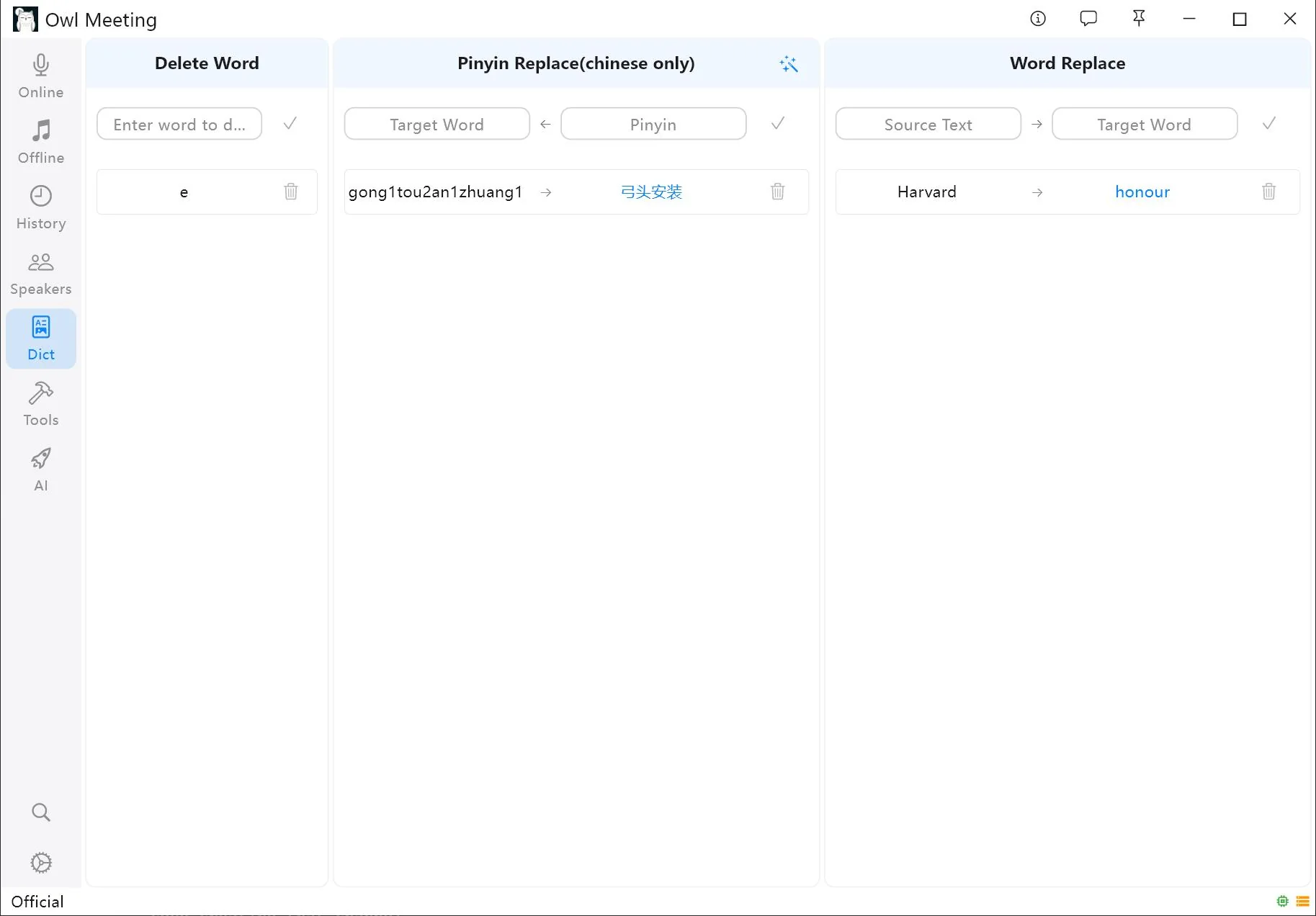
- Apply exact replacements carefully. A short source string may also occur inside an unrelated word. Review all matches before batch processing.
- Save reusable rules. Add stable corrections to the custom dictionary for future sessions, while keeping project-specific terms scoped appropriately.
- Verify in context. A replacement can be spelled correctly and still be the wrong term for that sentence.
Test the model and segmentation together
A model may perform differently across languages, accents, acoustics, and terminology. Select only models that support the spoken language, then compare them on the fixed evaluation sample. Do not infer quality from download size alone. Also test segment boundaries: more context may help recognition, while smaller segments may be easier to read and attribute.
For meetings, speaker segmentation can organize voices, but it does not solve recognition errors and becomes less reliable during overlap. If the number of participants is known, supplying it can constrain clustering. Review diarization separately from the words so a correct sentence is not assigned to the wrong person.
Use a controlled review checklist
- Preserve the original audio and settings used for every comparison.
- Change one variable at a time and use the same evaluation passage.
- Check names, numbers, negations, dates, decisions, and action items against playback.
- Search for recurring wrong forms after applying dictionary rules.
- Document unresolved inaudible sections rather than inventing words.
Frequently asked questions
Does denoising always improve transcription?
No. Denoising may make steady background sound less prominent, but aggressive processing can remove speech details or create artifacts. Compare a representative sample with the original before processing the full recording.
Can a custom dictionary make the recognizer understand every technical term?
No. A dictionary is most reliable for consistent correction and replacement after recognition; its effect on recognition depends on the product and model. It cannot recover a term that is inaudible or spoken over another voice.
Is an accent itself a recording problem?
No. An accent is a normal form of speech. Errors arise when the model has limited coverage for that speech pattern or when accent differences combine with noise, distance, speed, or weak context. Test models on the actual speakers and review respectfully.
Compare settings on one difficult sample
Choose a passage that contains the real speakers, noise, and terms, then compare each change against the untouched recording.