
Speaker-aware transcription
Speaker diarization vs. speaker identification
One answers "who spoke when?" with anonymous groups. The other asks whether a voice matches a known person. Mixing them up leads to the wrong settings and expectations.
A transcript can distinguish participants without knowing who they are. It can also recognize a known voice only after that voice has been enrolled and matched. These are related tasks, but they solve different problems and fail in different ways.
Two separate questions
Speaker diarization: who spoke when?
Diarization analyzes a recording, detects speech regions, extracts voice characteristics, and clusters similar regions. The output is a timeline labeled with anonymous groups:
00:00-00:12 Speaker_000:12-00:25 Speaker_100:25-00:41 Speaker_0
The system does not need to know either person's name. This is useful for interviews, meetings, podcasts, and calls where a readable transcript needs speaker turns.
Speaker identification: which known person is this?
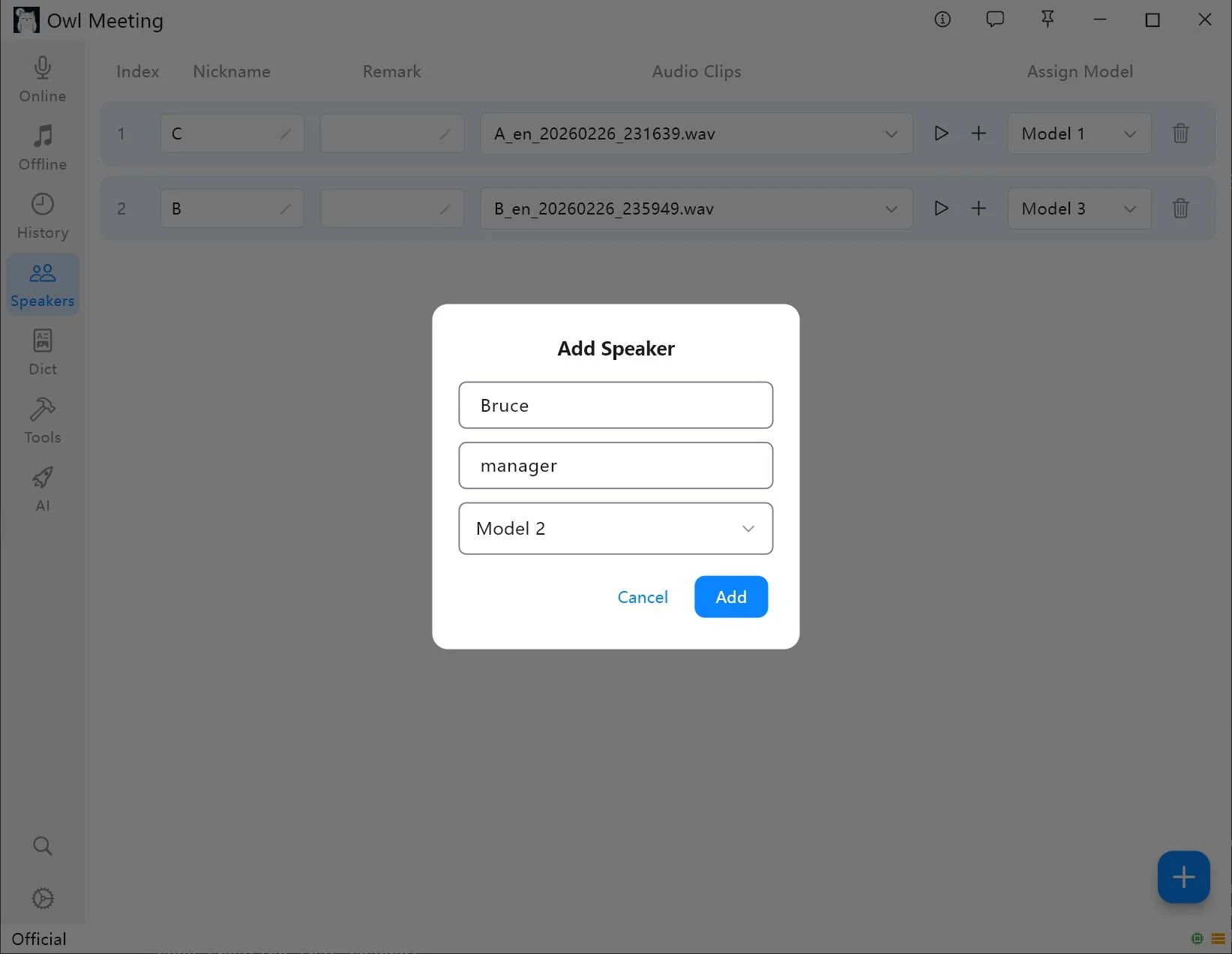
Identification compares a detected speaker with a library of known voice samples. When the match passes an identity threshold, an anonymous label can be replaced with a name. In Owl Meeting this library is stored locally and managed through the Speakers page.
Identification requires enrollment. If a person is not in the library, the system cannot infer the person's real-world identity from the recording alone.
| Diarization | Identification | |
|---|---|---|
| Main question | Who spoke when? | Is this a known enrolled person? |
| Prior samples | Not required | Required for automatic naming |
| Typical label | Speaker_0 | Alex, Priya, Interviewer |
| Main setting | Speaker count or clustering threshold | Voiceprint language and identity threshold |
| Common error | One person split, or two people merged | A known person not matched, or assigned incorrectly |
How the combined workflow operates
When both functions are enabled for file transcription, the order matters:
- Detect speech. The recording is divided into regions that contain speech.
- Cluster voices. Speaker diarization groups regions that appear to come from the same voice.
- Compare known samples. Identity Mark compares each resulting speaker group with the local voiceprint library.
- Apply a name when the threshold is met. A confident match replaces the temporary label; unmatched groups remain anonymous.
- Recognize and review the text. Speech recognition produces the transcript, and the user verifies labels and words against the source audio.
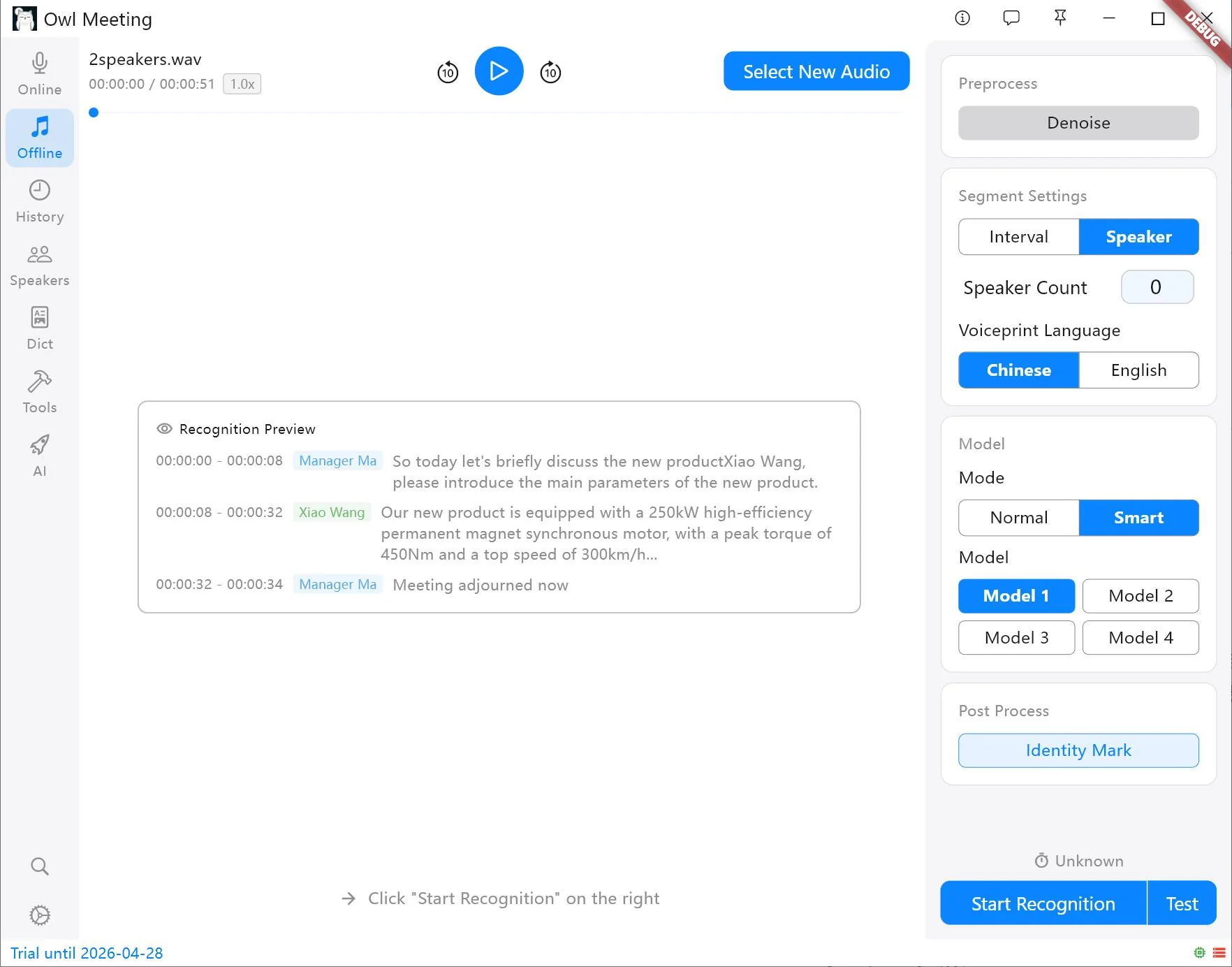
Settings affect different failure modes
Speaker count
If the number of participants is known, specifying it gives clustering a useful constraint. Automatic count is appropriate when the number is unknown, but the result depends more heavily on the clustering threshold and recording quality.
Clustering threshold
This controls how much difference the diarization process tolerates inside one speaker group. A setting that is too sensitive may split one person into multiple labels. A setting that is too permissive may merge two similar voices. Test the threshold on a section containing real speaker changes.
Voiceprint language
Owl Meeting provides separate Chinese and English voiceprint models. Samples and file-transcription settings need compatible voiceprint languages; otherwise identity matching can fail even when diarization itself works.
Identity threshold
The identity threshold determines how strong a match must be before a known name is applied. Raising it reduces weak matches but can leave known people unnamed. Lowering it can identify more segments but increases the risk of an incorrect name. Favor conservative automatic naming when identity matters.
Build useful voice samples
A voice sample should represent the person, not the room. Use a clear clip with only the target speaker and avoid overlap, loud music, or another voice in the background. A 5-30 second section is a practical range in the current Owl Meeting workflow.
One person may sound different through a conference microphone, phone call, headset, or distant room microphone. Adding more than one representative sample can help when the working recordings come from those distinct conditions. Do not add many near-duplicate low-quality clips; more data is not automatically better data.
Diagnose the label before changing everything
| Symptom | Likely layer | First check |
|---|---|---|
| One person appears as two speakers | Diarization | Speaker count, threshold, microphone changes, or background noise |
| Two people share one label | Diarization | Set the known count or make clustering more sensitive |
| Groups are correct but names are missing | Identification | Identity Mark, voiceprint language, samples, and identity threshold |
| A name is assigned to the wrong group | Identification | Raise the identity threshold and replace contaminated samples |
| Speaker labels are correct but words are wrong | Speech recognition | Recognition model, audio quality, language, and dictionary |
Separating these layers avoids a common mistake: changing the speech-recognition model to fix a clustering error, or changing speaker count to fix incorrect words. Evaluate speaker boundaries, names, and text independently.
Know the limits
- Overlapping speech can be difficult to assign because two voices occupy the same time region.
- Very short interjections may not contain enough voice information for stable clustering or identity matching.
- A person's voice varies with illness, emotion, distance, microphone, compression, and channel.
- Similar voices can be merged, while one changing voice can be split.
- Automatic names should be reviewed before they are used in formal minutes, research coding, or evidence.
For setup instructions, see Speaker Management. For file-level clustering and thresholds, see File Transcription.
Frequently asked questions
Does speaker diarization identify people by name?
No. Diarization separates a recording into speaker groups such as Speaker 0 and Speaker 1. Identifying a group as a named person requires a separate identity-matching step or manual labeling.
Do I need voice samples for diarization?
No. Diarization can group different voices without a pre-enrolled library. Voice samples are needed when the workflow should compare a speaker group with known people and apply their names automatically.
Why is one person split into two speaker labels?
A person's voice can change with distance, microphone, emotion, noise, or channel. An automatic clustering threshold can also be too sensitive. Specify the known speaker count or adjust the threshold and review the result.
Start with anonymous speaker groups
First verify that diarization creates the right speaker boundaries. Add identity matching only after the grouping is stable.