 Docs
Docs
🤖 AI Assistant Integration
Process your recognition results using models deployed in Ollama. Customize templates to handle various tasks.
1. Configure AI Service
Local Ollama (Recommended, Fully Offline)
- Visit ollama.com/download to download and install Ollama.
- Verify the service address in Owl Meeting's AI settings (default is
http://localhost:11434/api). - Click "Test" to confirm the connection is normal.
- Search for and pull the required model (e.g.,
qwen3:4b) in the Ollama model library.
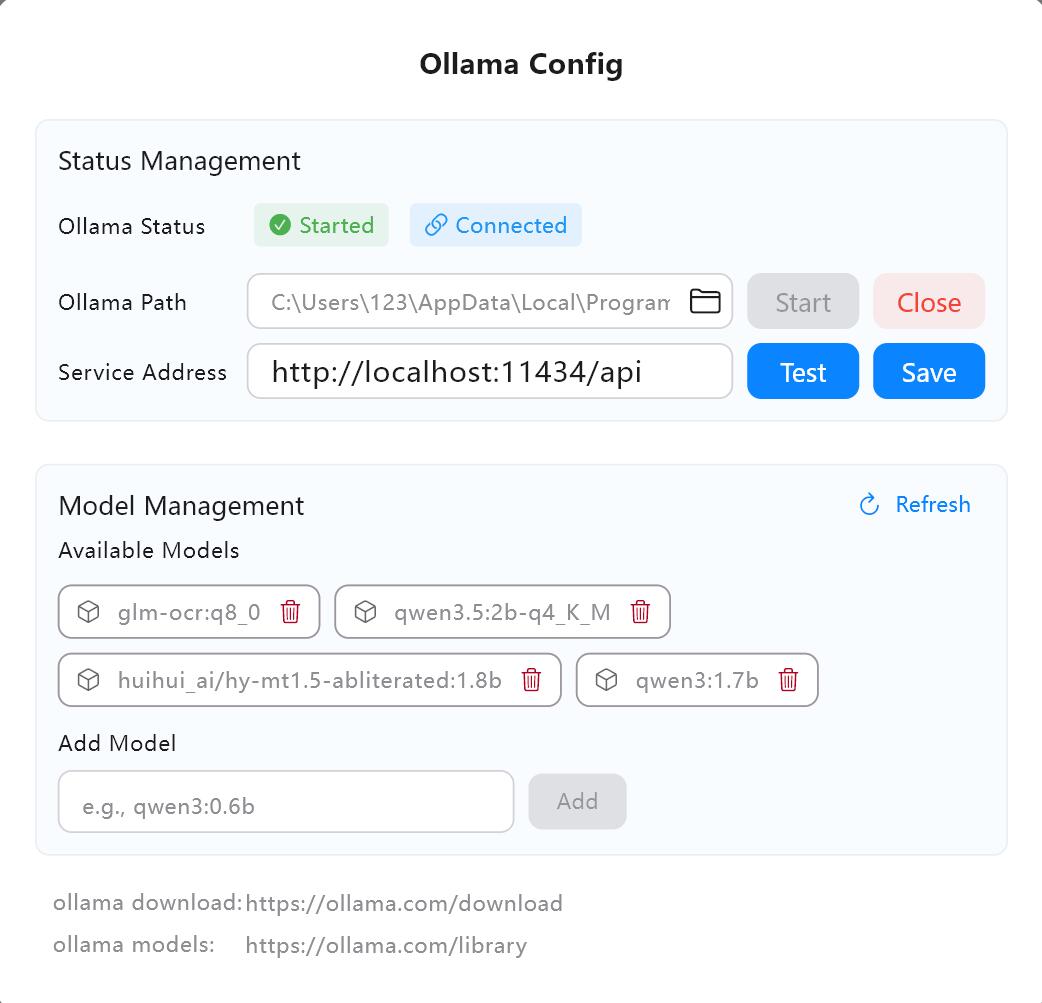 AI service configuration interface
2. Task Types
- Translation: Translate recognition results into other languages. You can specify source and target languages.
- Correction: Correct typos and grammatical errors, and optimize sentence structure for better flow.
- Summary: Generate meeting minutes or content summaries.
- Custom: Use custom Prompt templates to process results according to your needs (e.g., extracting action items, generating To-do lists).
3. Input Modes
- Single: Process segments one by one. This is the only mode available when using AI during real-time transcription.
- Batch: Merge multiple results and send them to the model together for higher efficiency. Batch size is customizable.
- All: Send all recognition results as a complete text at once. Ideal for generating meeting summaries or full-text translations.
4. Real-time AI vs Offline AI
- Real-time AI: During the real-time transcription process, each recognized segment is automatically sent to the model for processing and displayed synchronously. Requires starting the AI task in the sidebar first. Only "Single" mode is supported.
- Offline AI: Process completed transcription results in the history details page. Supports "Single", "Batch", and "All" modes.
5. Custom Model Parameters
Built-in configuration for common LLM parameters (e.g., temperature, top_p). Advanced users can enable the model parameters panel for fine-tuning or pass custom parameters in JSON format.
6. FAQ
- Q: Cannot connect to Ollama?
A: Check if Ollama is running and if the service address is correct. The default ishttp://localhost:11434/api. - Q: Slow output speed?
A: Switch to a model with fewer parameters (e.g., 1.5B or 4B), or change the input mode from "All" to "Single". - Q: Real-time mode says "Please click the blue button first"?
A: Real-time AI tasks require the AI engine to be started by clicking the blue button in the sidebar first.
7. Recommendations
- Translation Task: Recommended HY-MT1.5-1.8B—a professional translation model supporting multiple languages with very fast inference.
- General Tasks: Recommended Qwen3 series (e.g., 4B or 8B), which has excellent understanding capabilities.